|
1
|
From the Voyager main menu, choose Payables > Post Recurring Payable. The Post Recurring Payable filter appears.
|
 |
If you are using Voyager Construction and Job Costing, select Payable (JC) > Recurring Payable > Post Recurring Payable. The Construction and Job Costing filter includes an additional field, which is described in this procedure with the designation “Construction only.”
|
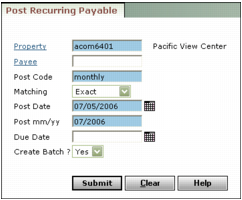
Property Type or select a property code.
Job (Construction only) Type or select a job code.
Payee Type a payee code.
Post Code Type the code you use to post the recurring payable. (You can have several recurring payables with the same post code.)
Matching Select the way you want Voyager to use your post code.
Exact The post code defined on the recurring payable must exactly match the text in the Post Code field.
Contains The post code defined on the recurring payable must contain the text in the Post Code field, but it may include additional characters before or after.
Starts with The post code defined on the recurring payable must begin with the text in the Post Code field, but it may include additional characters after.
Post Date Type or select the date you want to record the recurring payable.
Post mm/yy Type the month you want the recurring payable to affect the G/L.
Due Date Type or select the date you want to display as the day due on your payable invoices.
Create Batch To post this recurring payable in a payable batch that you must then separately post, select Yes. Voyager numbers the batch and gives it the description :PostRecur, with the current date and time. To immediately post the individual payables, select No.
|
3
|
Click Submit. Voyager posts the recurring payable and displays a summary message showing the amount of each invoice it recorded, and the total of all invoices.
|
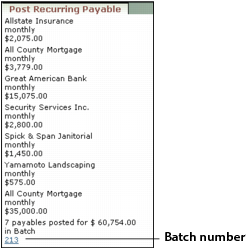
If you selected to post in a payable batch, Voyager displays the batch number as a link at the bottom of the screen. You can click the link to view the Batch Payable screen and post the batch. See “Posting Payable Batches” for information about posting a batch.