|
1
|
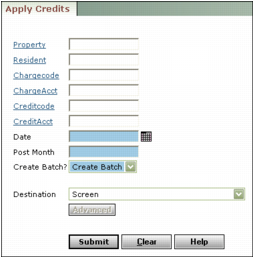
Property Type or select the property code.
Resident Type or select the resident or tenant code.
Chargecode Select the charge code for the charge.
ChargeAcct Select the G/L account for the charge.
Creditcode Select the charge code for the credit.
CreditAcct Select the G/L code for the credit.
Date Type or select the transaction date.
Post Month Type the post month.
Create Batch If you want to be able to verify the credits before they are applied, select Create Batch from the Create Batch drop-down list; otherwise select Post to G/L.
|
3
|
Click Submit. If you selected Post to G/L, Voyager posted the credit. If you created a batch, you must post the batch. See “Posting Receipt Batches” for instructions. The credit batch is identified with a colon, the letters CR, the date and time the batch was created, and the batch number. For example, :CR 07/11/06 09:49:44 (#357).
|