Creating YSL Reports : YSL Data Formats : Using YSL Function Default Values

Using YSL Function Default Values
When you are designing a YSL report, instead of leaving the cell empty or entering a zero, YSL returns the default value for that function. The majority of YSL functions return default values at design time. The purpose of the default value is to give you data to work with when designing your YSL report.
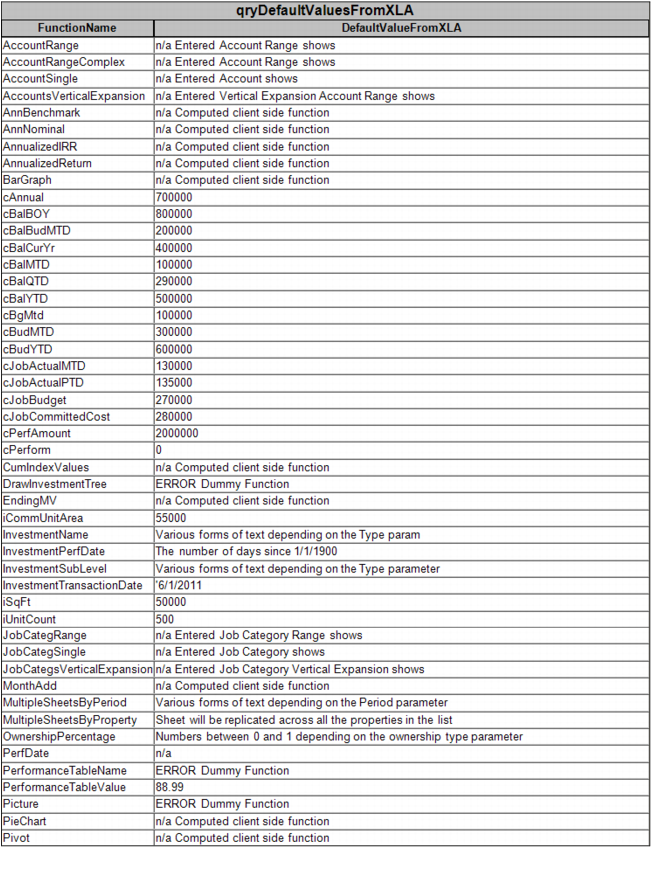
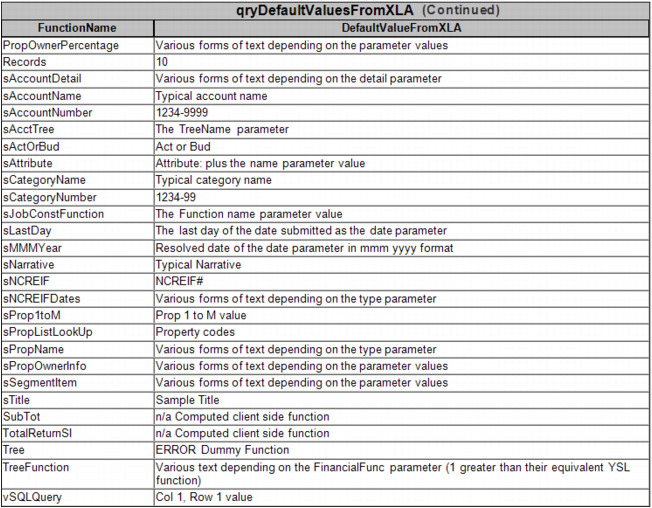
For a list of YSL function default values, see the qryDefaultValuesFromXLA table on page 62.
For example, if you have several columns that use the cBalMTD function and they total into a row at the bottom, the default value of 100,000 gives the Total line an actual value to work with instead of having zeroes all over the worksheet.
Another benefit of having a default value is that each YSL function returns a distinct default value at design time. For example, the cBalMTD function returns the value of 100,000 at design time, while the cBalYTD function returns 500,000. Once you become familiar with the default value associated with a function, you can determine which YSL function is entered in a cell simply by its default value.
For example, if you are designing a YSL report that should be using the cBalMTD function, but it is showing a default value of 300,000, then you know you entered the wrong function (300,000 is the default value for cBudMTD, not cBalMTD).
Note that default values are for design-time use only. For example, if you have an account that has a $0 balance when the YSL report is generated, the default value is not used. That account's information appears as $0.
Some YSL functions, such as sMMMYear, do not have default values because, at design time, they calculate similarly to any normal Excel function. Most of the functions without default values do not query the database for information.