Creating YSL Reports : Basic YSL Report Writing Procedures : Using YSL Cell Conventions

Using YSL Cell Conventions
When you customize the contents of Excel cells in YSL reports, you must adhere to the following cell conventions.
c
c
c
c
c
The following are some specific cell conventions for Rows 1 through 4, and are based on a “standard” financial YSL report filter.
Row1
Cells:
A1: First title
C1: Contains the title from the YSL report filter
D1: Contains the first date from the YSL report filter
E1: Contains the second date from the YSL report filter
F1: Leave blank
G1: Account Tree name
H1 and beyond: Use for extra items from the first SELECT statement: YSL Classic only
H1 and beyond: These cells accumulate any resolved items specified from the Special Row 1 Elements procedures. For more information, see “Special Row 1 Elements”: YSL.Net only
Row2
Cells:
B2: Contains All Books (all accounting type books), separated by a caret; for example, Accrual^Cash^GAAP
C2: Contains Book1; for example, Accrual
D2: Contains Book2; for example, Cash
E2: Etc.
Row3
Cells:
B3: Contains All Properties (all the property codes), separated by a caret; for example, acom6401^ares614^ahud119
C3: Contains Property1; for example, acom6401
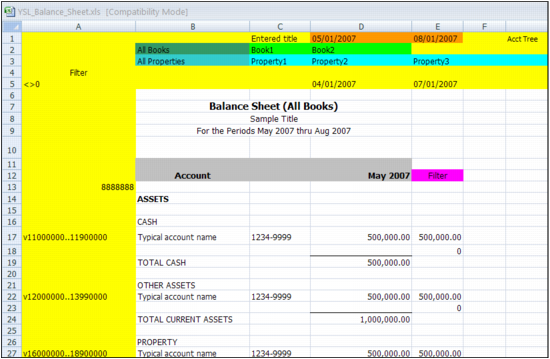
D3: Contains Property2; for example, ares614
E3: Etc.
Row4
Cells:
B4, C4, D4, E4: The first, second, third, and fourth set of G/L segments selected from the filter. Multiple segments can be entered, separated by carets; for example, admin^maint.
The requirements outlined in this section are illustrated in the following worksheet.