|
1
|
From the Excel top menu, select Add-Ins > Set YSL Options. The Yardi Spreadsheet Link User Options screen appears.
|
|
2
|
Click the Voyager YSL Design Helper tab.
|
|
3
|
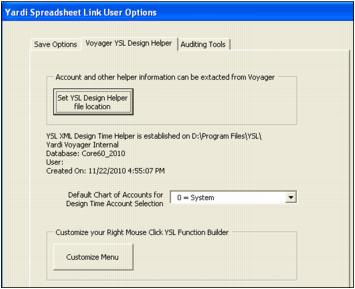
Yardi recommends that you click the Set YSL Design Helper file location button, and then select YSLDesignHelper.xml on your computer.
 |
The YSL Design Helper can be downloaded from the YSLMaintainReports.aspx page. The URL ../pages/YSLMaintainReports.aspx must exist within a Voyager menu set. If your installation does not include YSL Maintain Reports as a menu option, you must add it to any menu set. For more information, see “Adding Menu Items to Side and Title Menus” in the Voyager Core Installation and Administration Guide.
|