Creating YSL Reports : YSL Data Formats : Reversing the Sign of a Value

Reversing the Sign of a Value
The ISign parameter reverses the sign of a returned value. In a Voyager database, income accounts (rent, for example) are stored as negative balances. However, when you show an income account balance on a YSL report, you probably do not want it to appear as a negative value. To switch the sign of a value, enter -1 in its Sign parameter field.
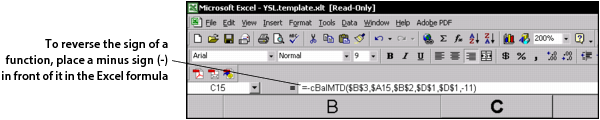
The Sign parameter can sometimes be confusing, so there is an alternative method for reversing the sign of a value: place a minus sign (-) in front of the function in the Excel formula field.
For example, to reverse the sign of cBalMTD($B$3,$A15,$B$2,$D$1,$D$1,-11), you would enter:
-cBalMTD($B$3,$A15,$B$2,$D$1,$D$1,-11).