 |
After a YSL report is generated, you can change and recalculate the formula in a single cell by editing that formula and then clicking Enter. The formula in that cell, and that cell only, is recalculated.
To recalculate the edited formulas across a multiple-YSL-report workbook, use the Reenable Calculation in Rendered Reports function, described in the following procedure.
 |
The Reenable Calculation in Rendered Reports function applies to generated (rendered) YSL reports; this is not a design-time procedure.
|
|
|
|
1
|
From the Excel top men, select File > Open.
|
|
4
|
Select Tools > Set YSL Options > Calculation Options > Reenable Calculations in Rendered Reports.
|
|
5
|
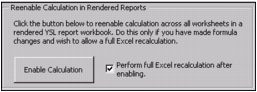
Select the Perform full Excel recalculation after enabling check box.
|
|
6
|
Click Enable Calculation. Your edited formulas are recalculated across the multiple YSL reports in your workbook.
|