The YSL Design Helper, YSLDesignHelper.xml, is an optional file. If it is present, drop-down lists of G/L accounts, performance tables and fields, and other database information make it easier to design a YSL report. For an example of this functionality, see “Entering YSL Functions”.
 |
In YSL.Net, Voyager YSL Design Helper replaces the functionality of the YSL Classic design-time Database Connection Options tab.
|
The YSL Design Helper file can be saved in a shared location within your organization. All YSL.Net report designers can then visit this location and customize their own Excel settings. For information about setting the location of YSLDesignHelper.xml, see “Setting YSL User Options”.
|
|
Before you can download the YSL Design Helper, you must add a menu item to the Voyager System Administration side menu. In the following procedure, YSL Maintain Reports was previously added as a submenu of Dashboard Setup. For more information, see “Adding Menu Items to Side and Title Menus” in the Yardi Voyager Core Installation and Administration Guide.
|
|
1
|
From the Voyager System Administration side menu, select Dashboard Setup > YSL Maintain Reports. The YSL.Net Setup screen appears.
|
|
2
|
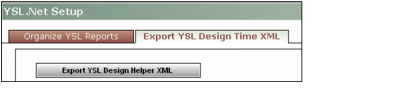
Click the Export YSL Design Time XML tab.
|
|
3
|
Click Export YSL Design Helper XML. Follow the prompts to save the YSLDesignHelper.XML file.
|