 |
Before you can download the YSL Design Helper, you must add a menu item to the Voyager System Administration side menu. In the following procedure, YSL Maintain Reports was previously added as a submenu of Dashboard Setup. For more information, see “Adding Menu Items to Side and Title Menus” in the Yardi Voyager Core Installation and Administration Guide.
|
|
1
|
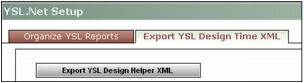
From the Voyager System Administration side menu, select Dashboard Setup > YSL Maintain Reports. The YSL.Net Setup screen appears.
|
|
2
|
Click the Export YSL Design Time XML tab.
|
|
3
|
Click Export YSL Design Helper XML. Follow the prompts to save the YSLDesignHelper.XML file.
|