Customizing the Excel toolbar is not a requirement; however, Yardi recommends that you add the Auditing toolbar to the Quick Access toolbar. The Auditing toolbar is especially helpful as you customize a YSL report, because it shows where the data is coming from for a selected cell. For example: In the following graphic, if you select Cell C15, and then click the Trace Precedents button ( ) on the Auditing toolbar, blue lines appear on the worksheet. These lines point to the data sources for Cell C15.
) on the Auditing toolbar, blue lines appear on the worksheet. These lines point to the data sources for Cell C15.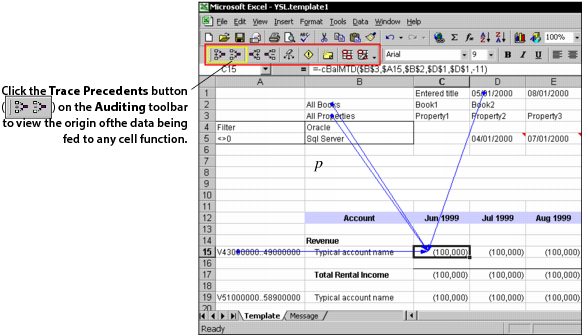
You need to perform this procedure only once in Excel. Subsequently, Excel automatically shows the Auditing toolbar.
|
1
|
From the Excel top menu, select Tools > Auditing > Show Auditing Toolbar.
|