This procedure runs the package OptEnableYslDotNet.pkg, which introduces a flag in the ParamOpt2 table. Service Manager reads this flag to determine whether it should use YSL.Net as the report generating engine. If a report is organized not to run as a YSL Classic report, Service Manager will generate that report using YSL.Net. For more information, see “Organizing YSL Reports: YSL.Net”.
|
1
|
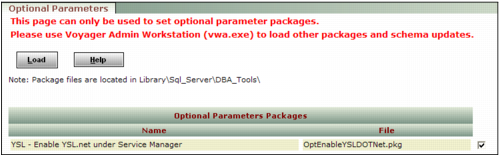
From the Voyager System Administration side menu, select Toolbox > Load Package. The Optional Parameters screen appears.
|
|
2
|
In the Optional Parameters Packages table, locate and select the check box next to the optional package named YSL - Enable YSL.net under Service Manager, with the file name OptEnableYslDotNet.pkg.
|
|
3
|
Click Load.
|