|
1
|
|
2
|
|
3
|
From the side menu, click Add-Ins.
|
|
4
|

|
5
|
|
6
|
|
7
|
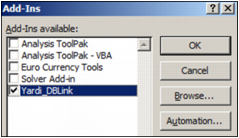
If Yardi_DBLink does not appear in the list:
|
|
a
|
Click Browse and locate the Yardi_DBLink.xla file.
|
 |
|
b
|
|
d
|
Select the Yardi_DBLink check box.
|
|
8
|
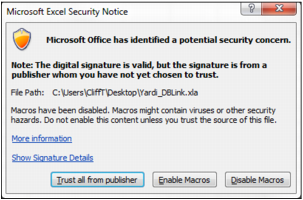
Click OK. The following graphic appears.
|
|
9
|
Click Trust all from publisher.
|
 |
 |
|
a
|
|
b
|
|
c
|
From the side menu, click Trust Center, then click Trust Center Settings. The Trust Center screen appears.
|
|
d
|
From the side menu, click Trusted Publishers. The following screen appears.
|
