 |
|
1
|
From the side menu, select Payables > Management Fees > Unpost Management Fee Calculation. The Delete Management Fee Calculation screen appears.
|
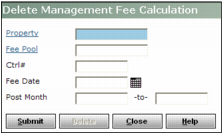
Property Type or select the code for the property.
Fee Pool Type or select the code for the fee pool.
Ctrl # If you want to unpost a specific payable invoice, payable adjustment or journal entry, type the control number of the transaction.
Fee Date Type or select the fee date used when you calculated the management fee.
Post Month Type or select a range of months used when you calculated the management fee.
|
3
|
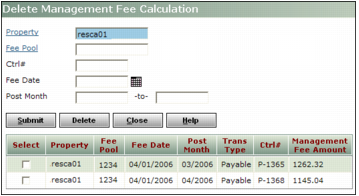
Click Submit. A table showing the posted management fees appears below the filter.
|
|
|
|
4
|
Select the Select check box for any management fee calculations you want to unpost.
|
|
5
|
Click Delete. A confirmation request appears.
|
|
6
|
Click OK. The rows you selected are removed from the table and the transactions used to calculate the management fees have be updated to be unposted to management fee.
|