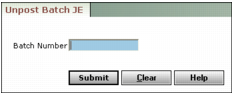
Unposting Journal Entry Batches When you unpost a journal entry batch, Voyager deletes the journal entries that were in the batch you unposted, and creates a new batch with the same journal entries with new control numbers. The new batch has the same name as the unposted batch, but preceded with a tilde (~). This feature is not available in Voyager Construction and Job Costing. To unpost a journal entry batch 1 From the side menu, select G/L > Unpost Batch JE. The Unpost Batch JE filter appears. 2 Type the batch number of the batch you want to unpost. 3 Click Submit. Voyager unposts the journal entries that were in the batch number you entered. A message displays the new batch number and the number of journal entries the new batch contains.