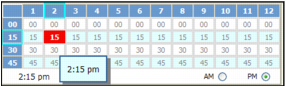
Most time fields include a Clock button  , which opens the Time Selector. The Time Selector includes one column for each hour on a 12-hour clock, and four rows, one for each 15-minute increment of an hour. You use the AM and PM buttons to specify whether the time is before or after noon.
, which opens the Time Selector. The Time Selector includes one column for each hour on a 12-hour clock, and four rows, one for each 15-minute increment of an hour. You use the AM and PM buttons to specify whether the time is before or after noon.If you prefer to type the time rather than select it, the format is hour:minute, followed by a space, followed by AM or PM. You do not have to type the colon. For example, for eight-fifteen in the evening, you would type 815 PM.