Deposit Interest : Comprehensive Deposit Interest : Setting Up Comprehensive Deposit Interest Rules

Setting Up Comprehensive Deposit Interest Rules
Before you can use the comprehensive deposit interest method to manage deposit interest, you must set up a rule that defines how you want Voyager to calculate interest. The rule tells Voyager when to calculate interest, which G/L accounts to use, and how to calculate and distribute the amounts due. You can set up more than one rule and specify which properties use each rule.
If you want to use different rules for different residents, you can associate rules with residents. Before you can associate a rule with a resident, you must associate it with the property.
Associating a rule with a property changes the Deposit Info tab on the Resident screen. If there is a rule associated with a property, the Deposit Info tab includes the Interest Accrued, Last Accrued and Last Credited fields and the deposit-interest rule.
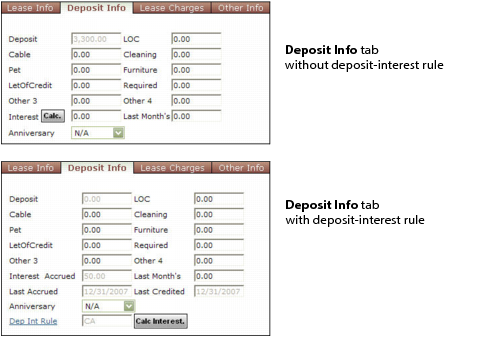
Adding a rule also adds the following items to the Reports menu on the Resident screen:
After you use the rule to calculate deposit interest, you will not be able to edit some fields. For example, you cannot change a G/L account or charge code for a used rule. If you want to change a field that cannot be changed, create a new rule and use it instead.
You cannot change a rule that is associated with a property or resident until all previously calculated interest for that property or resident has been distributed.
How to...
To add a deposit-interest rule
To review, edit or delete a deposit-interest rule
To associate a deposit-interest rule with a resident