This section describes how to generate a deposit slip to replace a damaged or lost slip. For information about creating a new deposit slip, see “Posting Receipt Batches”.
 |
|
1
|
From the side menu, select Reports > Receivables > Rewrite Deposit. The Deposit Slip filter appears.
|
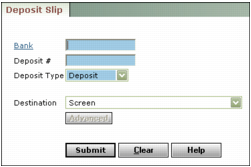
Bank Type or select the bank code.
Deposit # Type the deposit number. The deposit number appears in the Deposit Information section at the bottom left of each Receipt screen.
Deposit Type Select whether the deposit was for payments made by cheque (Deposit), electronic funds transfer (ACH), or Credit Card.
Destination Select the destination for the deposit slip. For more information about destinations, see “Report Destinations”.
|
3
|
Click Submit. Voyager creates the deposit slip.
|