This section describes how to use the Postdated Cheques screen to edit the amount, cheque date, number, name, submission date, charge code, and note, and to delete unapplied cheques.
You can reach postdated cheque records for viewing or editing from links on the Resident, Lease (commercial), or Owner (condo) screen.
 |
Resident screen ss_ReviewFromTenantScreen.pkg
Lease or Owner screen ss_ReviewFromLeaseScreen.pkg
For more information about loading packages, see “Updating Databases by Loading Optional Packages and Parameters” in the Voyager Core Installation and Administration Guide.
|
|
1
|
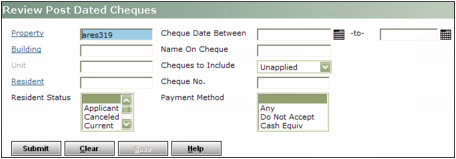
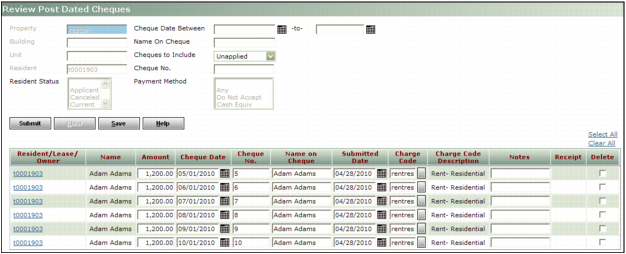
From the side menu, select Postdated Cheques > Review Postdated Cheques. The Review Postdated Cheques screen appears.
|
|
2
|
|
|
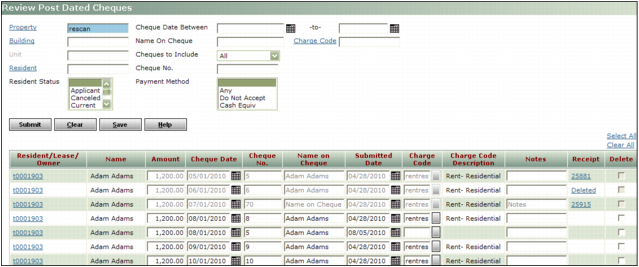
If a receipt control number or Deleted appears in the Receipt column, the cheque has been applied. Deleted means the receipt has been deleted, as would occur if the receipt batch containing the cheque was deleted. You can click the link to unapply the cheque.
|
|
4
|
If you want to delete a postdated cheque record, select the check box in the Delete column. When you click Save, the record will be removed from the table.
|
|
|
|
5
|
If you made any changes, click Save. A confirmation request appears.
|
|
6
|
Click OK. The table is updated with the changes.
|
|
1
|
|
|
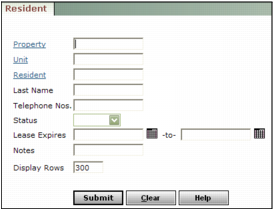
For more information on completing the filter, see “Reviewing Resident Records” in the Voyager Residential User's Guide.
|
3
|
|
4
|
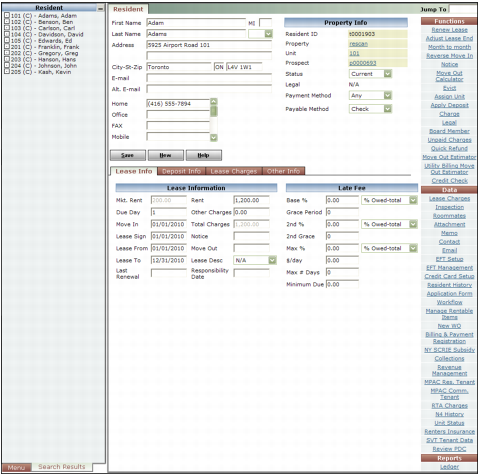
On the right side of the screen, under Data, click Review PDC. The Review Post Dated Cheques screen appears.
|
|
|
For the Review PDC link to appear on the Resident screen, you must load the ss_ReviewfromTenantScreen package.
|
|
6
|