|
1
|
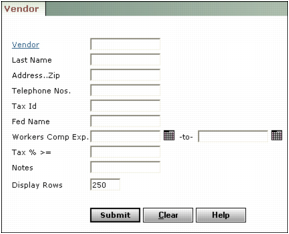
Vendor Type or select a vendor code.
Last Name Type all or part of the vendor name.
Address.Zip Type part of the vendor's address or ZIP Code.
Telephone Nos Type the area code to search for all vendors from that area, or type the full number to select a specific vendor.
Tax ID Type all or part of the tax identification number.
Workers Comp Exp Type a range of expiration dates for worker compensation insurance (the WorkComp field in the Vendor screen).
Tax% >= Type the sales tax rate for the vendor.
|
3
|
Click Submit. The Vendor screen appears, with the record for the first vendor matching your selection criteria in the main part of the screen. The navigation list displays links for all vendors matching the filter criteria.
|
|
5
|
Edit the record. See “To add a vendor” for detailed information about the fields.
|
|
6
|
Click Save.
|