|
l
|
Invoice # (unpaid payables only)
|
|
l
|
|
l
|
|
l
|
Notes (for both the payable and individual line items)
|
|
1
|
 |
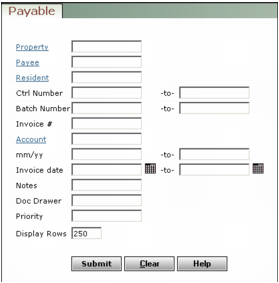
Property Type or select a property code.
Job Type or select a job code.
Payee If the payee is a vendor, type or select a vendor code.
Resident If the payee is a resident or tenant, type or select a resident or lease code.
Ctrl Number Type a range of payable control numbers. To review a single payable, type the control number for that payable in both fields.
Batch Number Type a range of payable batch numbers. To review payables from a single batch, type the batch number in both fields.
Invoice # Type the payable invoice number.
Account Type or select a G/L account number used for the payable.
mm/yy Type a range of post months (mmyy).
Invoice Date Type or select a range of invoice dates (mmddyy).
Notes Type text from the payable invoice Notes field.
Doc Drawer This field can be customized and may have a different label. Complete this customizable field as needed.
Priority This field can be customized and may have a different label. Complete this customizable field as needed.
|
3
|
|
|
|
5
|