|
1
|
 |
If you are using Voyager Construction and Job Costing, select G/L (JC) > Review Job Cost JE.
|
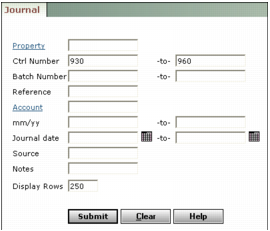
Property Type or select the property code.
Ctrl Number Type a range of journal entry control numbers. To review a single journal entry, type the same control number in both fields.
Batch Number Type a range of journal entry batch numbers. To review journal entries from a single batch, type the same batch number in both fields.
Reference Type text from the journal entry Reference field. Use the percent sign (%) as a wildcard.
Account Type or select a G/L account number used for the journal entry.
mm/yy Type a range of post months (mmyy).
Journal Date Type or select a range of journal entry dates (mmddyy).
Source Type text from the journal entry Source field.
Notes Type text from the journal entry Notes field.
|
3
|
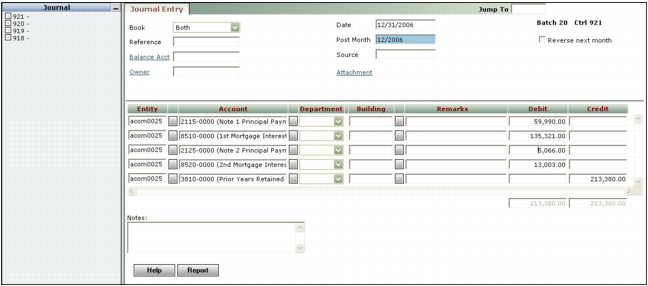
Click Submit. The Journal Entry screen appears, displaying the first journal entry matching the filter criteria. The navigation list at left displays all journal entries matching the filter criteria.
|