 |
The term ACH (Automated Clearing House) is sometimes used interchangeably with EFT (Electronic Funds Transfer) in Voyager. For more information about using EFT, see the Voyager Electronic Banking User's Guide.
|
|
1
|
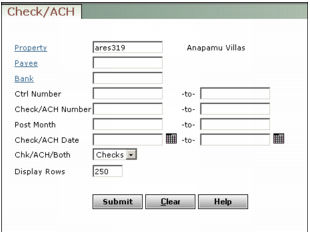
Property Type or select a property code.
Payee Type or select a payee code.
Bank Type or select a bank account code.
Ctrl Number Type the range of control numbers to review.
Check/EFT Number Type the range of the check or EFT numbers you want to review.
Post Month Type the range of post months (the month the transaction affects the G/L).
Check/EFT Date Type or select the range of check or EFT recording dates.
Check/EFT/Both Select the transactions you want to review. If you select Check, Voyager ignores EFT transactions. If you select EFT, it ignores checks. Select All to review both types of transaction.
|
3
|
Click Submit. The Check screen appears, displaying the first transaction matching your selection criteria. A list of checks matching your criteria appears in the navigation list at left.
|
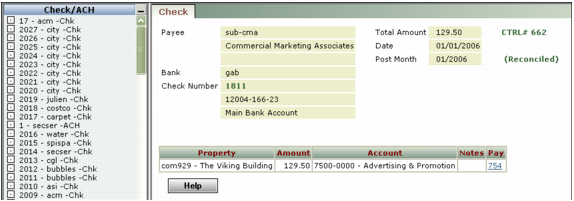
Review the information about the check for accuracy. The designation (Reconciled) appears to the right of the post month if the transaction has been reconciled. If a check is not reconciled, you can void it.