Receipts that have not been reconciled can be reversed. The Reverse button appears on the Receipt screen if the receipt can be reversed.
When you reverse a receipt, Voyager creates a new receipt with negative amounts to back out the original receipt. Voyager references the control number of the related receipt in the Notes field of each reversed receipt and its reversal. (Reversed) appears next to the control number of both receipts.
After you reverse a receipt, the Reverse button does not appear on the receipt. You cannot reverse the receipt again. If necessary, enter a new receipt to replace it.
|
1
|
In the Receipt screen for the receipt you want to reverse, click the Reverse button. The Reverse Receipt screen appears.
|
 |
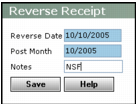
Reverse Date Type the date you want to reverse the receipt (mm/dd/yy).
Post Month Type the month you want your reversal to affect the G/L (mm/yy).
|
3
|
Click Save. Voyager asks you to confirm reversal.
|
|
4
|
Click OK. Voyager reverses your receipt.
|