Until you process a check for a payable, you can reverse a payable directly from the Payable screen. After you have processed a check for a payable, you must void the check before you can reverse the payable.
When you reverse a payable, Voyager creates a new payable record with negative amounts to back out the original payable. Voyager references the control number of the related transaction in the Notes field of the reversed payable and its reversing negative payable. The word Reversed appears at the top of the screen for a reversed payable, and the word Reversal appears on the screen for a reversing payable.
|
1
|
In the screen for the payable you want to reverse, click Reverse. The Reverse Payable filter appears.
|
 |
See “To review or edit a payable” for information about locating a posted payable.
|
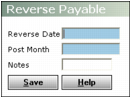
Reverse Date Type the date you want to record the reversal.
Post Month Type the month you want the reversal to affect the G/L.
Notes Type text for the Notes field of the reversing payable invoice.
|
3
|
|
4
|
Click OK. Voyager creates a reversing payable and displays a confirmation message. It adds a note to the payable you reversed with a reference to the control number of the reversing payable.
|