|
1
|
From the side menu, select G/L > Bank Functions > Bank Rec Exception Report. The Bank Balance Exception Report filter appears.
|
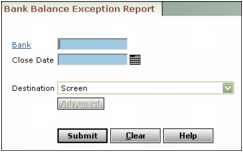
Bank Type or select the bank account code.
Close Date Type or select the ending date of the period.
|
3
|
Click Submit. The report appears. For information about other report destinations, see Chapter 11, “Reports.”
|