|
1
|
|
2
|
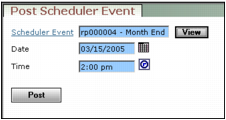
In the Scheduler Event field, type or select the name of the event.
|
Scheduler Event Type or select the name of the event. Once an event has been specified, you can click the View button to configure the way Voyager handles the event.
Date Type or select a posting date.
Time Type or select a posting time.
|
4
|
Click Post.
|