|
1
|
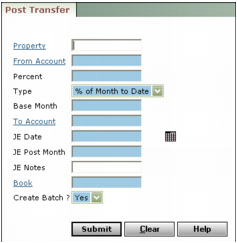
Property Type or select a property, properties, or a property list.
From Account Type or select the G/L account from which you want to post the transfer. The amount in this account will be reduced by the amount of the transfer.
 |
Percent Type the percentage of the From Account balance you want transferred, as a whole or decimal number.
Type Select the period for which the balance to be transferred should be calculated: year to date or month to date.
Base Month Type the “as of” month for the transfer.
To Account Select the G/L account to which you want to post the transfer. The amount in this account will be increased by the amount of the transfer.
JE Date Type or select the date the transactions will be recorded.
JE Post Month Type the month and year the journal entries will affect the account balances.
JE Notes Type general remarks about the journal entries.
Book Type or select the accounting method for your journal entries.
Create Batch To post the transfers in a journal entry batch, select Yes. To post the transfers directly to the G/L without creating a batch, select No.
|
3
|
Click Submit. Voyager posts your transfer and displays a message showing the properties and amounts for each journal entry it created.
|