|
1
|
From the side menu, select G/L > Post Recurring JE. The Post Recurring Journal Entry filter appears.
|
 |
If you are using Voyager Construction and Job Costing, select G/L (JC) > Recurring JE > Post Recurring JE. The Construction and Job Costing Post Recurring Journal Entry filter includes an additional field, which is described in this procedure with the designation “Construction only.”
|
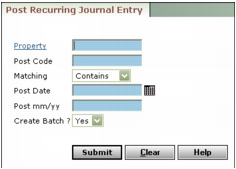
Job/CO (Construction only) Type or select a job or a change order code.
Property Type or select a property.
Post Code Type all or part of the posting code.
Matching Select the option that matches how you want Voyager to locate the Post Code. This option is useful when you want to post for multiple post codes. For instance, you could post for codes 0011, 0012, and 0013 by typing 001 in the Post Code field and selecting Starts With from the Matching field.
Post Date Type or select the date you want the recurring journal entry to affect the G/L.
Post Month Type the month and year for the posting month of the journal entry.
Create Batch Select Yes to create a journal entry batch that you must then post separately. Select No to post the journal entries directly to the G/L.
|
3
|
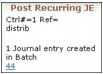
Click Submit. A summary message appears, showing the amount of each journal entry posted, and the total of all journal entries.
|