This section describes how to use the Conductor Report Monitor to monitor the progress of reports sent to Yardi Conductor. For more information about Conductor, see the Conductor Setup and Administration Guide.
The Conductor Report Monitor screen appears immediately after you click Submit in the filter for a report that will be processed by Conductor. This procedure explains another way to get to the Conductor Report Monitor screen.
|
1
|
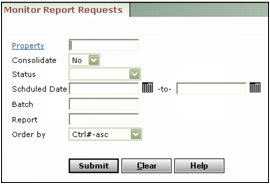
Property Type or select the property code.
Consolidate If the Property field contains a property list, select Yes to view only those reports that apply to the entire property list; select No to view reports for any properties in the property list.
Status Select a status to search for reports that are Processed, Not Processed, In Process, or had a Problem during processing.
Scheduled date Type or select the date range during which the reports were scheduled (mm/dd/yy) for processing. To monitor reports scheduled for one day, enter the same date in both fields.
Batch Type the batch code to monitor a specific report batch.
Order by Select the order in which you want reports displayed.
|
3
|
Click Submit. The Conductor Report Monitor screen appears. This screen also appears after you click Submit for a report that requires processing by Conductor.
|

|
4
|
Click Refresh to update the screen. As Conductor processes the report, the text in the Status column changes.
|
|
5
|
If you want to delete the report from the queue, select the Del check box for the report and click Delete.
|