|
1
|
From the side menu, select G/L > Bank Functions > Bank Deposit Merge. The Bank Deposit Merge filter appears.
|
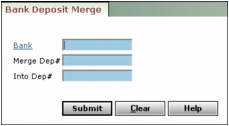
Bank Type or select a bank account code.
Merge Dep# Type the deposit number of the deposit record you want to merge into another deposit.
Into Dep# Type the deposit number of the deposit record you want to receive the merged deposit.
|
3
|
Click Submit. Voyager merges the deposits and displays a report showing the checks included in the merged deposit. To print the report, click the Internet Explorer Print button
 . . |