You must set up intercompany accounting before you can post intercompany reimbursements. For more information, see “G/L Segments” in the Voyager Core Setup Guide.
|
1
|
From the side menu, select Payables > Interco Reimbursement. The Intercompany Reimbursement filter appears.
|
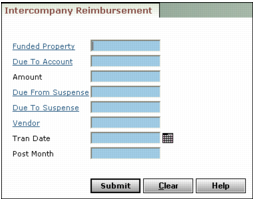
Funded Property Type or select the code for the property being funded.
Due To Account Type or select the due-to account for this reimbursement.
Amount Type the amount to move between the properties.
Due From Suspense Type or select the due-from suspense account for this transaction.
Due To Suspense Type or select the due-to suspense account for this transaction.
Vendor Type or select the vendor code for the funding entity.
Tran Date Type or select the date you want to record the intercompany reimbursement transactions (mmddyy).
Post Month Type the month these transactions affect the G/L (mmyy).
|
3
|
Click Submit. Voyager confirms the intercompany reimbursement.
|
|
4
|
Click OK.
|