The Management Fee Calculation Summary report displays the commission calculated for each property, by month. In spite of the name, this report works with the Pay Commission feature rather than the Management Fees feature. For a comparison of the two features, see “Property-Management Fees Overview”.
|
1
|
From the side menu, select Payables > Management Fee Calc Summary. The Management Fee Calculation filter appears.
|
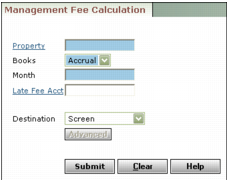
Property Type or select a property code.
Books Select the accounting book.
Month Type the month for the commission.
Late Fee Acct If you pay 100% of late fees as commission, type or select the late fee G/L account number. If you want to pay the same commission percentage for late fees as you do for other G/L accounts, leave this field empty and select the Commissionable check box in the Account Info screen for the late fees G/L account.
Destination Select the report destination. For more information about destinations, see “Report Destinations”.
|
3
|
Click Submit.
|