|
1
|
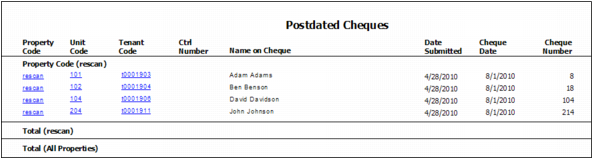
From the side menu, select Receivables > Postdated Cheques > Post Dated Cheques Report. The Postdated Cheques filter appears.
|
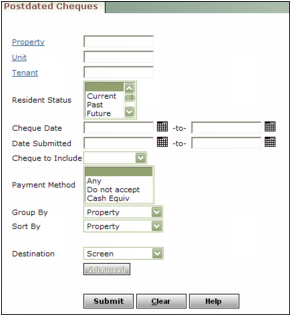
Property Type or select the property code.
Unit Type or select the unit code.
Resident Type or select the resident, lease or owner code.
Resident Status Select the resident status.
Cheque Date Type or select the range of cheque dates.
Date Submitted Type or select the range of cheque submission dates.
Payment Method Select the types of payment method you want to include: Any, Do not accept, Cash Equiv.
Group By Select the way you want the report organized: Property, Resident, Cheque Date, or Submission Date.
Sort By Select the way you want the data sorted within the group: Property, Resident, Cheque Date, or Submission Date.
Destination Select the destination. For more information see “Using the Destination Drop-Down List”.
|
3
|
|
1
|
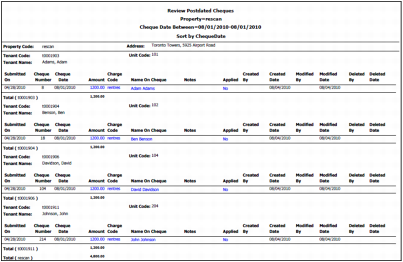
From the side menu, select Receivables > Postdated Cheques > Post Dated Cheques Listing. The Review Postdated Cheques filter appears.
|
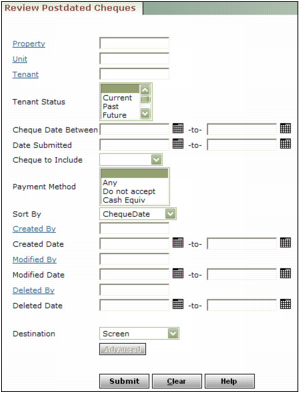
Property Type or select the property code.
Unit Type or select the unit code.
Tenant Type or select the resident, lease or owner code.
Tenant Status Select the status of the resident.
Cheque Date Between Type or select the range of cheque dates.
Date Submitted Type or select the range of cheque submission dates.
Payment Method Select the types of payment method you want to include: Any, Do not accept, Cash Equiv.
Created By Type or select the user who created the record.
Created Date Type or select the range of dates the record was created.
Modified By Type or select the user who modified the record.
Modified Date Type or select the range of dates the record was modified.
Deleted By Type or select the user who deleted the record.
Deleted Date Type or select the range of dates the record was deleted.
Destination Select the destination. For more information see “Using the Destination Drop-Down List”.
|
3
|