The simple deposit interest method allows you to pay each resident the amount specified in the Interest field on the Resident screen. You can either create a payable batch with a payable for one or more residents or add a credit charge to an individual resident for the amount of the deposit interest.
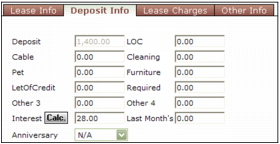
Before you can pay deposit interest using this method, you must complete the Interest field on the Deposit Info tab on the Resident screen. For more information, see “Calculating Simple Deposit Interest”.
 |
|
1
|
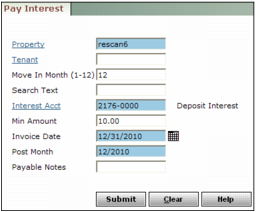
Property Type or select the property code.
Resident If you are posting interest for only one resident, type or select the resident code.
Move-In Month Type the number that corresponds with the month the resident moved in.
Interest Acct Type the G/L account number for resident interest payments.
Min Amount Type the smallest amount for which you want to make payments.
Invoice Date Type or select the recording date for the interest payment invoices.
Post Month Type the month and year in which the interest payments will affect the G/L.
Payable Notes Type remarks for the Notes field on the interest invoices.
|
3
|
Click Submit. Voyager posts interest invoices in a payable batch and a confirmation message appears. The payable batch number appears as a link. You can click the link to review the payable batch.
|
|
|
|
1
|
Open the resident record. For more information, see “Reviewing and Editing Resident Records” in the Voyager Residential User's Guide.
|
|
2
|
Click the Deposit Info tab.
|
|
3
|
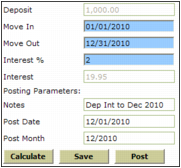
Deposit Voyager displays the amount of the deposit.
Move-In Voyager displays the move-in date of the resident. If you want to calculate deposit interest from a different date, type the date from which you want to calculate deposit interest.
Move Out Type the date to which you want to calculate and distribute deposit interest. This is the date used to calculate deposit interest to.
Interest % Type the interest rate.
Interest Voyager displays the current amount of deposit interest from the Interest field on the Deposit Info tab of the Resident screen.
Notes Type text to appear in the Notes field of the credit charge.
Post Date Type the date you want Voyager to post the deposit interest credit charge.
Post Month Type the post month you want Voyager to post the deposit interest credit charge.
|
5
|
|
6
|
Click Post. A confirmation message appears. To view the charge, click the link.
|
|
7
|