|
1
|
|
3
|
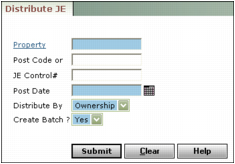
Complete only one of the following fields:
|
Post Code To distribute recurring journal entries, type the code you use to post the recurring journal entries.
JE Control # To distribute a single journal entry, type the control number of the journal entry.
Post Date Type or select the date the distribution will affect the G/L.
Distribute by Select List % to distribute the amount across all properties in a property list; select Ownership to distribute the amount among ownership shares of a property.
Create Batch To post the distributions in a journal entry batch, select Yes. To post the distributions directly to the G/L without creating a batch, select No.
|
5
|
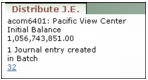
Click Submit. Voyager distributes the journal entry and displays a confirmation message listing the total number of journal entries and all properties included in the distribution.
|
|
6
|
 .
.