|
|
1
|
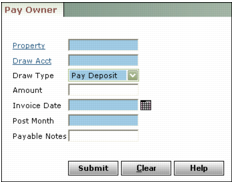
Property Type or select a property code.
Draw Acct Type or select the G/L account for paying owner draws.
Draw Type Select the way you want to post your owner payments.
Pay Deposit This option pays owners their share of the balance in the main cash account, less any reserves. Deposits are the YTD totals of all G/L accounts with the Resident Deposit check box selected in the Account Info screen. Voyager includes any deposits held in the main cash account.
Hold Deposit This option pays owners their share of the balance in the main cash account, less any reserves. Voyager does not include deposits held in the main cash account.
Flat $ Amount Unless your organization has defined ownership as number of shares, Voyager defines each owner's share as a percentage of the property. When you post, this option multiplies the flat amount by each owner's percentage owned, as defined in the Ownership screen. If your organization has defined property ownership as number of shares, Voyager multiplies the flat amount by each owner's number of shares, as defined in the Ownership screen.
Amount Type an amount in this field only if you selected Flat $ Amount as your Draw Type. Type the monetary amount you want to pay owners.
Invoice Date Type the recording date for the owner invoices.
Post Month Type the month the owner payments affect the G/L (mmyy).
Payable Notes Type text to appear in the Notes field on the invoice.
|
3
|