|
1
|
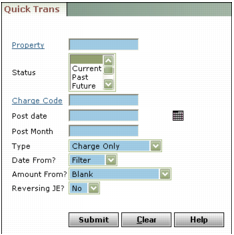
Property Type or select a property code.
Status Select the resident or tenant status.
Charge Code Type or select a charge code.
Post Date Type or select the post date.
Post Month Type the post month.
Type Select a transaction type.
Date From Select from which screen you want the transaction to use the date from this filter or the move-in date.
Amount From Select where Voyager should get the transaction amount from. If you want to enter the amounts yourself, select Blank.
Reversing JE Select whether you want to automatically reverse the journal entry.
|
3
|
|
5
|
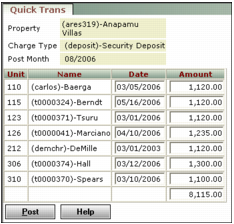
Click Post. Voyager asks you to confirm that you want to post.
|
|
6
|