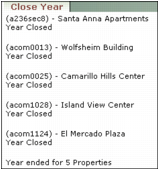
Closing the year clears G/L income and expense account totals and carries forward balances in assets, liabilities, and capital accounts. Before closing the year, close the last month of the fiscal year. You do not need to perform this procedure if Automatic Close Year is selected in the Operation section of the Accounts & Options screen. In that case, Voyager automatically closes the year for each property when you close the last month of the fiscal year for the property.
|
1
|
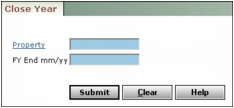
Property Type or select the code for a property, properties, or a property list.
FY End mm/yy Type the last month of the fiscal year for the property (mmyy).
|
3
|
Click Submit. Voyager closes the year for all selected properties that use the specified fiscal year end and displays confirmation.
|