General Ledger : Closing Procedures : Closing the Operating Month

Closing the Operating Month
Voyager uses its operating month as the default post month for new transactions. Closing the month advances the program's operating month.
The operating month appears in the About screen you access by selecting Administration > About.
Closing the month carries forward year-to-date account totals, and saves month-end account totals. It calculates and saves the month-to-date totals for the upcoming month.You usually close a month at the end of the month, after you have entered all transactions for that month.
To close the operating month
1
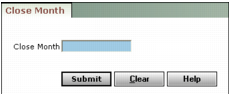
From the side menu, select G/L > End Period > Close Month. The Close Month filter appears.
2
3
Click Submit. Voyager closes the operating month and displays a confirmation message.