General Ledger : Closing Procedures : Closing the Leasing Week

Closing the Leasing Week
Closing the lease week blocks any changes to leases entered in the prior week. This procedure prevents changes to leases that have already been reported for occupancy workflow.
To close the lease week
1
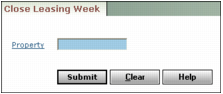
From the side menu, select G/L > End Period > Close Leasing Week. The Close Leasing Week filter appears.
2
3
Click Submit. Voyager increments the leasing week start date by one week for each property.