You can close the receivable, payable, and journal months separately. You can view the A/R, A/P, and journal months for a property in the Accounting Control section of the Property Control screen. You open the Property Control screen by clicking the Property Control link in the Functions menu of any Property screen.
If your organization uses separate data-entry months for each property, each property's data-entry month advances only when you use Close Property. You must use this procedure for each property or property list.
To use this procedure, the Manual Property Close check box must be selected in the Accounts & Options screen.
 |
|
1
|
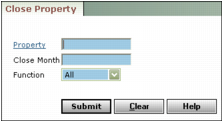
Property Type or select the code for a property, properties, or a property list.
Close Month Type the data-entry month and year you want to close (mmyy).
Function Select the transaction types you want to close: All, Receivable, Payable, Journal, or Rec/Pay (receivables and payables).
|
3
|
Click Submit. Voyager closes the data-entry month and displays confirmation.
|