The simple deposit interest method allows you to easily calculate a percentage or flat amount of interest for a single resident or all residents of a property. This method is easy to use because it requires no setup. If you use this method, Voyager does not prevent you from paying interest more than once to the same resident for the same period.
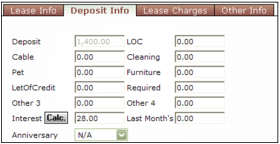
You can calculate deposit interest for an individual resident or for multiple residents. Voyager calculates the deposit interest and updates the Interest field on the Deposit Info tab of the Resident screen.
 |
The Interest field and Calc. button do not appear on the Deposit Info tab of the Resident screen if a deposit-interest rule was set up for the property. In that case, you must use the comprehensive deposit-interest distribution method. For more information, see “Comprehensive Deposit Interest”.
|
|
1
|
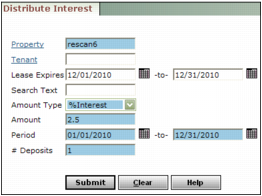
Property Type or select a code for one or more properties or property lists.
Resident Type or select a code for a resident or residents.
Lease Expires Type or select a range of lease expiration dates.
Amount Type Select the way that you want Voyager to distribute the deposit interest.
Flat $ Amount Distribute a total flat monetary amount. Voyager bases the distribution on each resident's share of total deposits, and the length of time that each resident was an occupant.
% Interest Distribute a percentage of the resident's deposit amount. Voyager calculates the interest as a percentage of the amount in the Deposit field on the Resident screen.
Amount Type the amount of interest that you want Voyager to distribute, either as a flat amount or percentage based on your selection in the Amount Type field.
If you selected Flat $ Amount in the Amount Type field, type the total monetary amount that you want Voyager to distribute as interest. Voyager distributes the total amount among the residents who match the filter criteria. Voyager bases the distribution on each resident's share of total deposits, and the length of time each resident or was an occupant.
If you selected % Interest in the Amount Type field, type the annual percentage rate that you want Voyager to distribute as interest. For example, to pay at an annual rate of 5%, type 5; to pay at a rate of 6-3/4%, type 6.75. The interest is non-compounding. Voyager pays a percentage of the amount displayed in the Deposit field on the Resident screen.
Period Type or select a range of dates during which interest accumulated.
Voyager uses this date range with the date in the Move-In field on the Resident screen. When distributing a flat amount among multiple residents, Voyager prorates the amount of interest due residents who moved in during the period. When distributing a percentage to multiple residents, it calculates the number of months and days interest accumulated for each resident.
 |
# Deposits Type the number of security deposit fields from the Resident screen that Voyager should use for calculating interest on security deposits. Typing 1 tells Voyager to use only the first deposit field; typing 4 tells Voyager to use the first four fields. You cannot skip a deposit field and use others after it.
|
3
|
Click Submit. Voyager distributes the interest and displays a message showing the amounts and recipients of distributions.
|
|
1
|
Open the resident record. For more information, see “Reviewing and Editing Resident Records” in the Voyager Residential User's Guide.
|
|
2
|
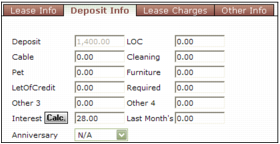
Click the Deposit Info tab.
|
|
3
|
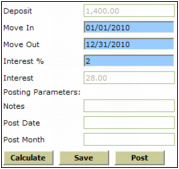
Deposit Voyager displays the amount of the deposit.
Move-In Voyager displays the move-in date of the resident. If you want to calculate deposit interest from a different date, type the date from which you want to calculate deposit interest.
Move Out Type the date to which you want to calculate deposit interest. If you are calculating the amount of deposit interest only, and the tenant will remain a current tenant, this is the date used to calculate deposit interest to.
Interest % Type the interest rate. By default, this field displays the percentage from the % of Interest on Deposit field on the Property Control screen. For information about setting up that field, see “To add a property record” and “% of Interest on Deposit” in the Core Setup Guide.
Interest Voyager displays the current amount of deposit interest from the Interest field on the Deposit Info tab of the Resident screen.
|
5
|
|
6
|
Click Save. The Interest Calculator screen closes. The Interest field on the Deposit Info tab of the Resident screen is updated with the amount from the Interest field on the Interest Calculator screen.
|
 |
|
7
|
Click Save on the top part of the screen.
|