When rent is due at the beginning of a month, the property manager applies the postdated cheque for that month. Applying postdated cheques creates an unposted receipt batch. For information about posting a receipt batch, see “Posting Receipt Batches”.
 |
If Receipts to Newest Charges is selected in on the Property Control screen, the PDC is applied in the same way, however, newest charges are paid first rather than oldest.
|
|
1
|
From the side menu, select Receivables > Postdated Cheques > Apply Postdated Cheques. The Apply Postdated Cheques screen appears.
|
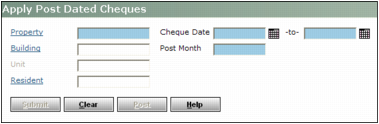
Property Type or select the property code.
Building Type or select the building code.
Resident Type or select the resident, lease or owner code.
Cheque Date Type or select the earliest and latest dates for the cheques.
Post Month Type the month to which to post the postdated cheques. Voyager creates one detail receipt batch each time you perform this procedure. If you want to post to multiple months, you must perform this procedure once for each post month.
|
3
|
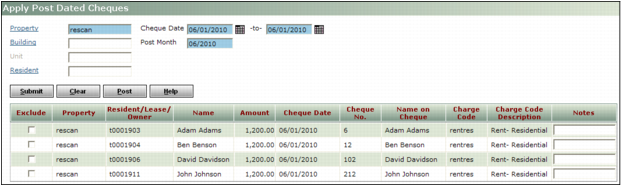
Click Submit. A table below the filter appears
|
|
4
|
To exclude a record from being applied, select the Exclude check box.
|
|
5
|
To apply the postdated cheques and create the receipt batch, click Post. A confirmation request appears.
|
|
6
|
 |
|
|
Receipt batches for postdated cheques appear in the Batch List preceded by a colon and the letters PDC, like this: :PDC 08/14/06 09:04
|