
Attachments : Attachment Procedures : Adding an Attachment

Adding an Attachment
Use this procedure to add the following types of files as attachments:
l
l
To add an attachment
1
2
Click Attachment in the Data or Functions menu. The Attachments screen appears.
3
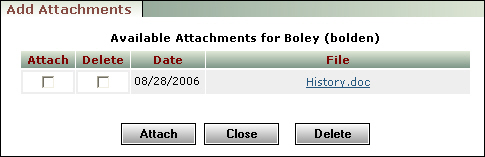
Click Add. The Add Attachments screen appears, displaying attachments available for the record.
4
Select the Attach check box for each file you want to attach to the record.
5
Click Attach.
6
Click Close. The screen closes and the added attachments appear in the Attachments screen.
7
If appropriate, make changes to the Type and Description fields, and the Secure and Weblinks check boxes.
8
Click Save.