You can add charges to a batch until you post the batch. You can add charges to any charge batch through either the detail batch process or the summary batch process. This procedure explains how to add a charge using the detail batch procedure. For information about adding a charge to a batch using the summary batch procedure, see “Adding Charges to an Existing Batch”.
|
1
|
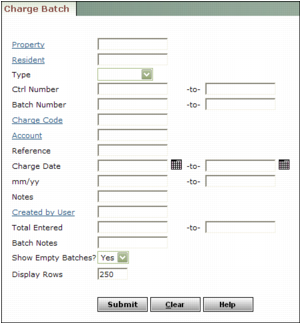
Property Type or select a property code.
Resident Type or select a resident code.
Type Select whether the charge batch is for residents, owners, vendors, or customers.
Ctrl Number Type or select a control number or range of control numbers.
Batch Number Type or select a batch number or range of batch numbers.
Charge Code Type or select a charge code.
Account Type or select a G/L account number.
Reference Type text from the charge Reference field.
Charge Date Type or select a date or range of dates.
mm/yy Type a month or range of months.
Notes Type text from the Remarks field for a line item.
Created by User Type or select a user code.
Total Entered Type an amount or range of amounts.
Batch Notes Type text from the Notes field for the batch.
Show Empty Batches Select whether you want Voyager to display the links for empty batches in the list of batches that match the search criteria.
|
3
|
|
4
|
|
5
|
|
6
|
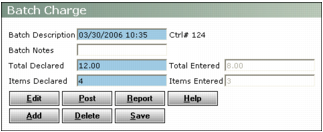
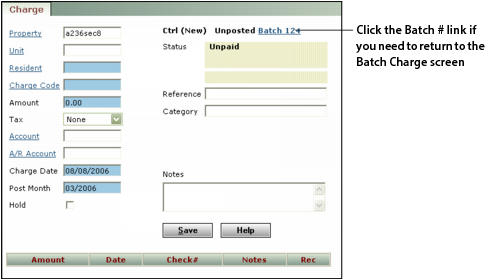
Complete the screen and click Save. Each time you click Save, Voyager presents a new Charge screen until the Items Entered matches the Items Declared, or the Total Entered matches or exceeds the Total Declared. Then it displays the Batch Charge screen.
|